If your plan includes more than one website but the Host Dada Control Panel only seems to show one, don't worry: your other websites are there. Every website on a plan lives inside the same hosting package, which is listed under its main domain. This guide shows you where to find each site, its files and its email, and how to add more.
How websites on one plan are organised
When your plan allows several websites, you don't get a separate hosting account for each one. You get one hosting package, and each website is a domain added to it, with its own folder for its files. That's why:
- Your Client Area shows one hosting service, because you have one plan and one bill.
- Manage Services in the Control Panel lists the package once, under its primary domain (usually the first website you set up). Your other websites appear only as a small +1 others (or +2, +3 and so on) next to it.
- Everything for every website on the plan (domains, files, email, databases and SSL) is managed from inside that one package.
| Plan | Websites you can host |
|---|---|
| LAUNCH (Essential) and WP Launch | 1 |
| ELEVATE (Essential) | 5 |
| SUMMIT (Essential) and WP Growth | 10 |
| WP Scale | 30 |
Find all the websites on your plan
- Log in to the Host Dada Control Panel. Go to cp.hostdada.uk, or from the Client Area choose Services, select your hosting, then Login to Control Panel.
-
Open Manage Services. Click Manage Services in the top menu. Your hosting package is listed by its Primary Domain. If it hosts more than one website, you'll see +1 others (or more) beside that domain.
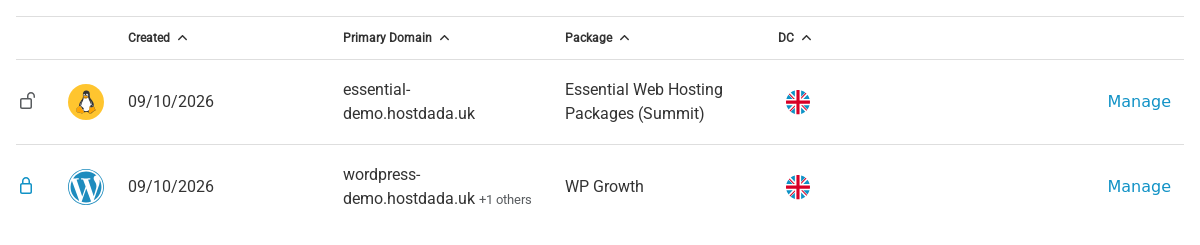 A package hosting two websites appears once, under its primary domain, with "+1 others" beside it.
- Click Manage next to the package. This opens the package that holds all of its websites.
-
Open Domains. In the Domain Names section, click Domains. Under Manage Domains you'll see every website on the package, with the main one labelled Primary domain.
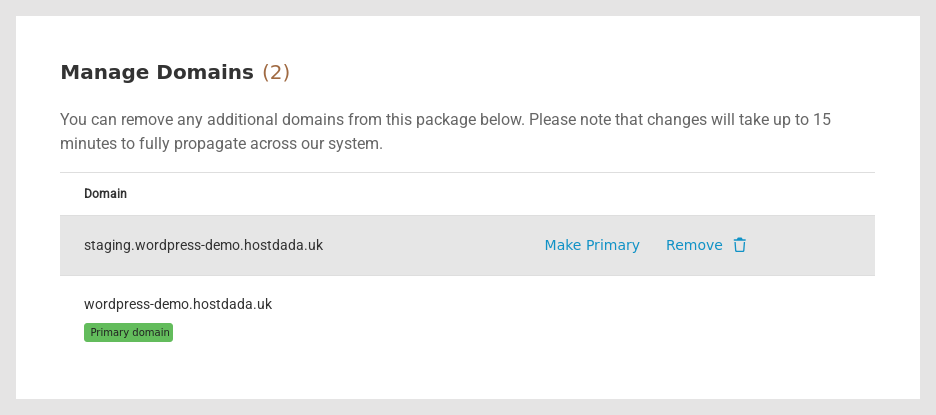 Every domain on the package is listed under Manage Domains. The number in brackets is how many there are.
public_html for your main site and public_html/secondsite.co.uk for another. Open that folder in File Manager to work on that website's files.Where each website's things live
| What you want to manage | Where to find it, for any website on the package |
|---|---|
| Website files | File Manager (or FTP), in that website's document root folder |
| Email addresses | Email Accounts: choose the domain when you create a mailbox |
| Databases (for WordPress and other software) | MySQL Databases: all the package's databases are listed together |
| SSL certificates | SSL/TLS, for each domain once it points to Host Dada |
| PHP version | Change PHP Version applies to the whole package, so all its websites share it |
Add another website to your plan
If you haven't used all your websites yet, add the next one from the same Domains page: type the domain under Add a Domain, click Add Domain, give it its own folder and point the domain to Host Dada. The full steps are in Add a website, domain or subdomain to your hosting.
Troubleshooting
I can only see one website in the Control Panel
That's normal: the package is listed once, under its primary domain. Look for +1 others next to it in Manage Services, then open the package and go to Domains to see every website on it.
My second website isn't in the Domains list
It hasn't been added to this package yet, or it's on a different package or account. Check every package in Manage Services. If it isn't anywhere, add it using Add a website, domain or subdomain to your hosting, or open a ticket and we'll find it for you.
My second domain shows my main website
Its document root is still the main website's folder (public_html). Change it to the second website's own folder in the Manage Domains list and allow up to 15 minutes.
I want my main website to be a different domain
Use Make Primary next to the domain in Manage Domains. The package is then listed under that domain in Manage Services. If you're not sure what this will change for your website and email, ask us first.
Related articles
Last reviewed: October 2026
