Transfer files securely with SFTP, log in to your hosting from the command line with SSH, and deploy code from GitHub, GitLab or Bitbucket with Git Version Control. SSH and Git are included with SUMMIT, WP Growth and WP Scale plans.
Before you start
- You'll need your Host Dada Control Panel login. See How to log in to the Host Dada Control Panel.
- SSH uses key-based login (a pair of matching files: a private key that stays on your computer and a public key you give us). Windows 10 and 11, macOS and Linux all have the tools built in.
- Not sure which plan you have? See Which hosting do I have?
SFTP: secure file transfer
SFTP works like FTP but runs over an encrypted SSH connection. It uses your normal FTP details.
| Setting | Value |
|---|---|
| Protocol | SFTP - SSH File Transfer Protocol |
| Host | ftp.hostdada.uk |
| Port | 22 |
| Username and password | Your FTP username and password from FTP Details (or an extra FTP account) |
FTP must be unlocked for SFTP logins to work. See Connect with FTP and find your FTP details for where to find the password and how to unlock.
SSH: command-line access
-
Create an SSH key on your computer (skip this if you already have one). Open Terminal (Mac or Linux) or Windows Terminal / PowerShell (Windows) and run:
Press Enter to accept the default location, and set a passphrase if you'd like extra protection. This creates two files in thessh-keygen -t ed25519 -C "my-laptop".sshfolder in your user folder:id_ed25519(private, never share it) andid_ed25519.pub(public). -
Copy your public key. Open
id_ed25519.pubin a text editor (or runcat ~/.ssh/id_ed25519.pub) and copy the single line that startsssh-ed25519. - Open SSH Access. Log in to the Host Dada Control Panel, open your package and click SSH Access in the Security section.
-
Add the key. Paste the line into Public Key, type a Handle (a label such as
laptop) and click Add Public Key.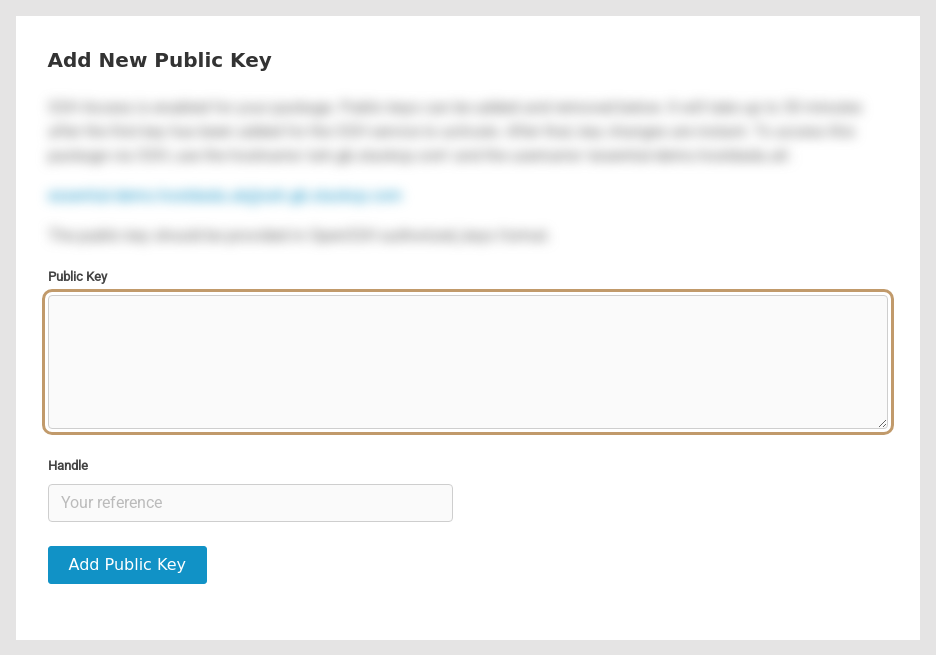 Paste your public key and give it a handle. The hostname and username for your package are shown in the text above (blurred here).
-
Note your SSH hostname and username. They're shown on the same page, in the form
yourdomain.co.uk@hostname. Your username is your package's main domain. -
Wait for SSH to switch on. After the first key is added, SSH can take up to 30 minutes to activate. After that, adding or removing keys takes effect straight away. Your keys are listed under Manage Public Keys, where Remove revokes a key (do this for lost laptops and leavers).
 Each key you add is listed with its handle.
-
Connect. In your terminal, run the command shown on the SSH Access page, for example:
The first time, typessh yourdomain.co.uk@hostname-from-the-SSH-Access-pageyesto trust the server. You'll start in your home folder; your website is inpublic_html.
Tools available over SSH
| Tool | Command | Use it for |
|---|---|---|
| WP-CLI | wp | Manage WordPress (run it inside the site folder, e.g. cd public_html) |
| Git | git | Pull code from a repository |
| Composer | composer | Install PHP dependencies |
| PHP | php | Run PHP scripts |
| MySQL client | mysql | Import or query databases (use the database host shown in MySQL Databases) |
php command may not use the same version as your website. Check with php -v. Your website's version is set in Change PHP Version.Git Version Control (deploy from GitHub, GitLab or Bitbucket)
Git Version Control lets you clone a repository onto your hosting and deploy updates with a click, without using the command line.
- Open Git Version Control. It's in the Web Files section. The first time, enter a Name and Email (used to label Git actions) and click Enable.
-
Create a repository. Under Create Repository, choose Clone a Repository to copy an existing repository, or Local Repository to start an empty one. For a clone, fill in:
- Clone Url: for example
https://github.com/yourname/yoursite.git - Repository Path: the folder to clone into, relative to your home folder, e.g.
repos/yoursite. If it doesn't exist, it's created for you. - Repository Name: any label you like
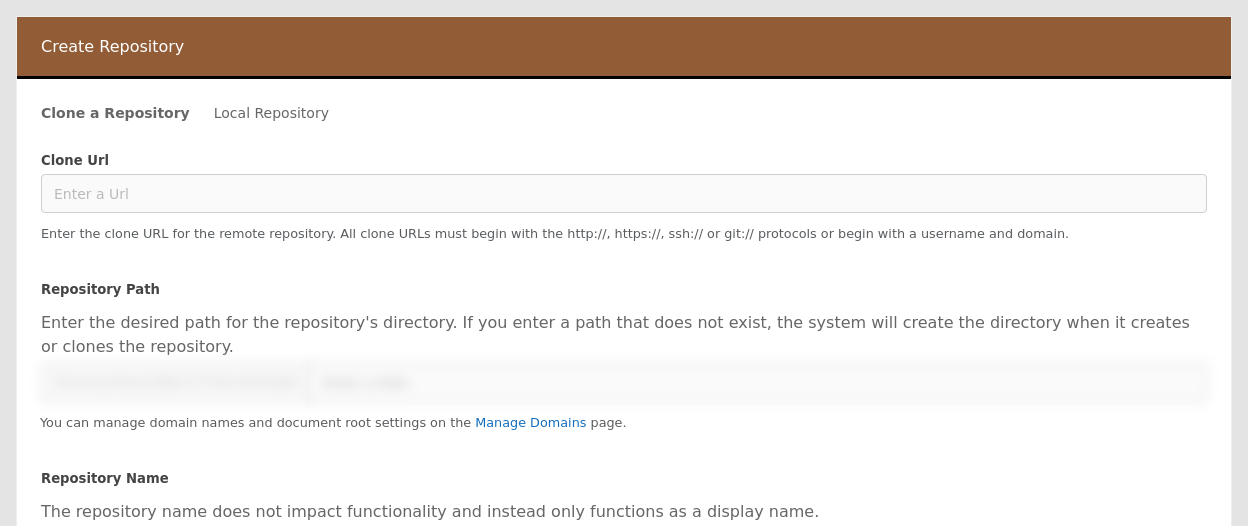 Cloning a repository with Git Version Control.
Click Create Repository.
- Clone Url: for example
- Private repositories: click View SSH Keys at the top of the page, copy the RSA Public Key and add it to your repository as a read-only deploy key (in GitHub: repository Settings → Deploy keys). Then use the SSH clone address, such as
git@github.com:yourname/yoursite.git. Never copy or share the private key shown on that page. -
Manage and deploy. Click Options next to a repository and choose Manage.
- Basic Information: set the Deployment Branch (for example
main) and, optionally, a Deployment Script to run when you deploy. - Deployment: click Deploy to pull and deploy the latest commit.
- History: see what was deployed and when.
- Basic Information: set the Deployment Branch (for example
public_html can expose your .git folder to the web. Clone into a folder outside public_html (such as repos/yoursite) and point your domain's document root at the right subfolder in Domains, or copy files across in your deployment script.Troubleshooting
"Permission denied (publickey)"
If you added your first key less than 30 minutes ago, wait and try again. Otherwise, check the username is your main domain (not your email), the key you added matches the private key on your computer (ssh -i ~/.ssh/id_ed25519 ...), and the key was pasted as one line in OpenSSH format.
I don't see SSH Access, or it says SSH isn't available
SSH is included with SUMMIT, WP Growth and WP Scale. On other plans, use FTP or SFTP, or ask us about upgrading.
PuTTY won't accept my key
PuTTY needs keys in its own .ppk format (PuTTYgen can convert them). It's usually easier to use the built-in ssh command in Windows Terminal or PowerShell.
Git clone fails with "Repository not found" or "Permission denied"
For private repositories, add the deploy key from View SSH Keys to the repository and use the SSH clone address, not HTTPS.
Last reviewed: October 2026