
This article explains how you, the admin, can change your business phone and email address in Office 365.
Need help setting this up?
If you'd rather not deal with the technical side, we can fully set up and manage your Microsoft 365 for you — including email, DNS, and ongoing support.
If you're looking for how to change your company's profile information, such as company name and address, company phone number, and technical contact information, see Change your organization's address, technical contact email, and other information.
To update your name, phone number, and email address
Use the Personal info page to change your name, mobile phone number, and alternate email address. The alternate email address is used for important notifications, such as resetting your Office 365 admin password (not your computer admin password).
-
Browse to the Office 365 admin center.
-
Click Settings
 > Office 365 Settings > Personal info.
-
On the contact details section, update your phone, primary email address and alternate email address. Make sure you use something different from your Office 365 email address for your alternate email address.
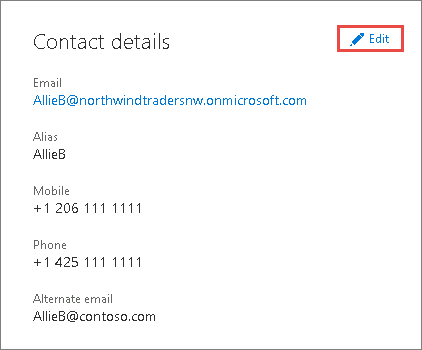
IMPORTANT: The alternate email address and the mobile phone number are needed for resetting your Office 365 admin password (not your computer admin password).
For answers to billing questions, see:
Related Guides
- Share calendars with external users
- Centralised deployment of add-ins
- Manage deployment of add-ins
- Message center
- Basic mailbox settings for Outlook and other email clients (POP/IMAP)
Prefer us to handle this?
We provide fully managed Microsoft 365 setup and support — so you can focus on running your business.


