
Need help setting this up?
If you'd rather not deal with the technical side, we can fully set up and manage your Microsoft 365 for you — including email, DNS, and ongoing support.
1. Open Mozilla Thunderbird.

2. In the left panel you can see a list of your email accounts. Double Click on "Inbox" or if its hidden, click on your email, and it will expand and show the inbox, the trash list. etc.
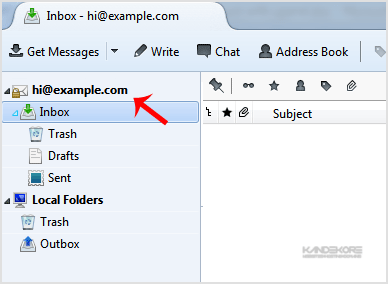
Anther option is to right click on the email and click on "Get Messages".
Thunderbird also automatically checks email every 5 to 10 minutes. It also automatically checks mail when you open the program.
Prefer us to handle this?
We provide fully managed Microsoft 365 setup and support — so you can focus on running your business.


