Turn on the free SSL certificate for your website so it loads securely over https:// with a padlock, then force every visitor onto the secure version. The certificate covers your domain and all its subdomains and renews automatically.
Before you start
- Your domain must be added to your hosting package (see Add a website or domain).
- For the free certificate, the domain must use the Host Dada nameservers:
ns1.kandekore.net,ns2.kandekore.net,ns3.kandekore.netandns4.kandekore.net. If you changed them recently, wait until the change has spread (usually a few hours, up to 48 hours). See Point your domain to Host Dada.
Activate free SSL
- Log in to the Host Dada Control Panel. Go to cp.hostdada.uk (or Client Area → Services → your hosting → Login to Control Panel) and open your package.
- Open SSL/TLS. It's in the Security section. The page is called SSL/TLS Certificates.
-
Click Activate Free SSL. Under Free SSL Certificate, each domain is listed with its SSL Active status and whether it's Using Our Nameservers. Click Activate Free SSL next to your domain.
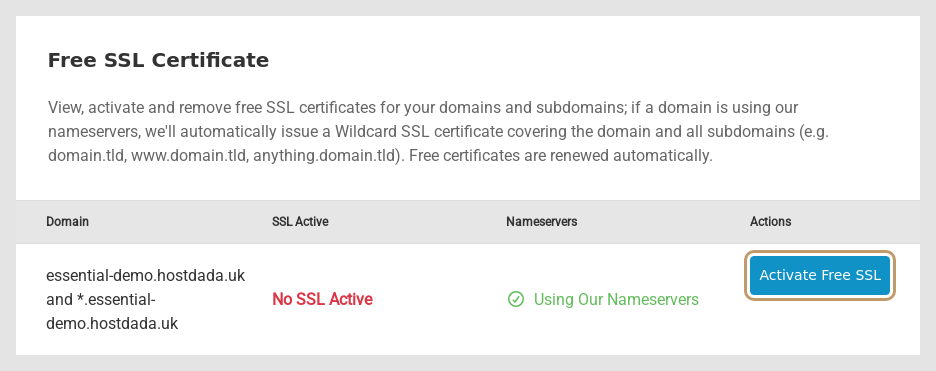 A domain on Host Dada nameservers gets a wildcard certificate covering every subdomain.
- Wait for it to show as active. Issuing usually takes a few minutes. Refresh the page until the status changes. The certificate renews itself automatically, so there's nothing to do each year.
Force HTTPS (send every visitor to the secure site)
- Make sure the certificate is active first. Forcing HTTPS without one causes browser warnings.
-
Switch on Force HTTPS. On the same page, under Force HTTPS, click the switch so it no longer says Force HTTPS Disabled.
 Force HTTPS redirects all visitors to https:// at the platform level.
- Allow up to 30 minutes, then visit
http://yourdomain.co.uk. You should be sent tohttps://automatically. - WordPress sites: in WordPress, go to Settings → General and make sure both addresses start with
https://. See Change your WordPress site address.
imap.yourdomain.co.uk are covered. For email apps, we still recommend imap.hostdada.uk and smtp.hostdada.uk, which always work. See Email settings for any device.Domain not using Host Dada nameservers?
The free wildcard certificate needs our nameservers, because the certificate authority checks ownership through DNS. If your DNS must stay elsewhere (for example with Cloudflare or a company IT provider), you can buy a certificate and install it under Install External SSL Certificate on the same page by pasting the Certificate, Key and CA Bundle / Intermediate Certificate. Allow up to 30 minutes for it to go live. See Buy and install a paid SSL certificate and Free SSL vs paid certificates.
Troubleshooting
There's no Activate button, or activation fails
- Check the Nameservers column says Using Our Nameservers. If not, update the nameservers at your registrar and wait for them to take effect.
- If DNSSEC was switched on at your previous DNS provider, turn it off at your registrar. Old DNSSEC records stop the check from working.
- Remove any old
_acme-challengerecords from your DNS. They're left over from a previous host and get in the way.
The padlock is missing or the browser says "Not secure" on some pages
The certificate is fine but the page loads images or scripts over http:// (mixed content). See Fix "not secure" and mixed-content warnings.
"Too many redirects" after forcing HTTPS
Something else is also redirecting, such as a plugin, an .htaccess rule or Cloudflare's "Flexible" SSL mode. Keep one method only. Turning off the plugin's redirect and leaving Force HTTPS on is usually the simplest.
Last reviewed: October 2026
